 By
By 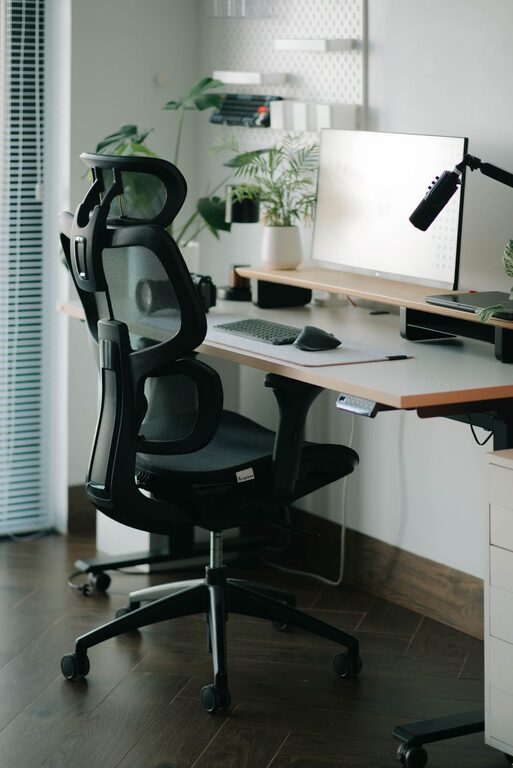
Creating a desk setup that promotes both focus and comfort is essential for anyone who spends significant time working at a desk. Whether you are working from home, in an office, or studying, a thoughtful workspace can improve your productivity and wellbeing. This guide offers practical tips to help you design a desk setup that supports concentration and physical comfort.
Why Desk Setup Matters
Your desk setup impacts how well you can focus and how comfortable you feel throughout the day. A cluttered or poorly arranged workspace can cause distractions, fatigue, and even physical discomfort. On the other hand, an organized and ergonomic desk can reduce stress, improve posture, and help maintain energy levels.
Choosing the Right Desk and Chair
Desk Size and Shape
Start with a desk that fits your available space and work needs. You don’t need an enormous desk, but make sure it offers enough room for your computer, essential tools, and some writing space. Consider a desk shape that suits your work style—straight desks are classic, while L-shaped desks provide extra surface area for multitasking.
Ergonomic Chair
Invest in a chair that supports your back and promotes good posture. Key features to look for include adjustable seat height, lumbar support, and armrests. Sitting comfortably helps prevent aches and encourages longer, more focused work sessions.
Proper Monitor and Screen Placement
Eye Level Alignment
Place your monitor so that the top of the screen is at or slightly below your eye level. This helps avoid neck strain and keeps your head in a natural, relaxed position.
Distance from Eyes
Position your monitor about an arm’s length away from your eyes. This reduces eye strain and makes it easier to view the screen without leaning forward.
Dual Screens Setup
If you use two monitors, align them side by side. Place the primary screen directly in front of you and the secondary screen adjacent to it. This setup minimizes head turning and improves workflow.
Keyboard and Mouse Positioning
Keep your keyboard and mouse close to each other and within easy reach. Your elbows should stay close to your body and form roughly a 90-degree angle when typing or using the mouse. Consider using an ergonomic keyboard or mouse to reduce wrist strain.
Organizing Your Desk for Focus
Declutter Regularly
A tidy desk helps maintain mental clarity. Remove unnecessary items and keep only what you need daily. Use storage solutions like drawers, trays, or organizers to keep supplies out of sight but accessible.
Cable Management
Loose cables can create a messy look and distract you. Use cable ties or clips to bundle cords and keep them neatly tucked away.
Personal Touches
Adding a few personal items such as photos or plants can make your workspace inviting and boost your mood. Just avoid overcrowding the desk with too many decorations.
Lighting for Comfort and Productivity
Good lighting is vital for reducing eye strain and maintaining alertness.
– Use natural light when possible by positioning your desk near a window.
– Avoid glare on your screen by adjusting blinds or repositioning your monitor.
– Use a desk lamp with adjustable brightness and color temperature to suit different times of day.
Incorporating Movement and Breaks
Even with a perfect desk setup, taking regular breaks is essential. Stand up, stretch, or walk around every hour to refresh your mind and body. Consider a sit-stand desk if you want to alternate between sitting and standing throughout the day.
Additional Comfort Tips
– Use a footrest if your feet don’t comfortably reach the floor.
– Place a cushion or lumbar roll for additional lower back support.
– Keep a water bottle nearby to stay hydrated.
Final Thoughts
Optimizing your desk setup for focus and comfort doesn’t require expensive equipment or a complete overhaul of your space. Small, deliberate adjustments to your desk, chair, monitor placement, and organization can make a big difference. The goal is to create a workspace that supports your productivity while keeping you physically comfortable and mentally engaged.
By investing time in setting up your desk thoughtfully, you are setting yourself up for more productive, enjoyable workdays. Try these tips and customize your workspace to what feels best for you.